


Dell Pro P 24 P2426 24.1-inch WUXGA 5ms Monitor


Key Features
- 24.1-inch WUXGA (1920 x 1200) IPS display with 16:10 aspect ratio
- 100Hz refresh rate for smoother scrolling and motion
- 5ms grey-to-grey response time in Fast mode
- 99% sRGB colour gamut coverage
- ComfortView Plus technology helps reduce blue light emissions
- Fully adjustable ergonomic stand with height, tilt, swivel and pivot adjustments
- HDMI and DisplayPort connectivity
- Integrated USB hub for convenient peripheral connectivity
- VESA 100 x 100 mm mounting compatibility
Technical Specifications
| Specification | Details |
| Brand | Dell |
| Model | P2426 |
| Manufacturer Part Number | 210-BVJR |
| Product Type | LED IPS Monitor |
| Display Size | 24.1-inch |
| Viewable Image Size | 61.13 cm (24.1-inch) |
| Resolution | 1920 x 1200 (WUXGA) |
| Aspect Ratio | 16:10 |
| Panel Type | IPS |
| Refresh Rate | 100Hz |
| Response Time | 5ms GTG (Fast) 8ms GTG (Normal) |
| Brightness | 300 cd/m² |
| Contrast Ratio | 1500:1 |
| Colour Support | 16.7 Million Colours |
| Colour Gamut | 99% sRGB |
| Viewing Angle | 178° Horizontal 178° Vertical |
| Display Surface | Anti-Glare with 3H Hard Coating |
| Stand Adjustments | Height Tilt Swivel Pivot |
| VESA Mount Compatibility | 100 x 100 mm |
| Connectivity | HDMI DisplayPort USB Hub |
| Colour | Dark Grey |
| Height | 343.70 mm |
| Width | 531.80 mm |
| Depth | 50 mm |
| Height with Stand | 511.20 mm |
| Width with Stand | 531.80 mm |
| Depth with Stand | 181.75 mm |
| Compressed Height with Stand | 364 mm |
| Extended Height with Stand | 511.20 mm |
| Bezel Width (Top) | 6.70 mm |
| Bezel Width (Bottom) | 13 mm |
| Bezel Width (Left) | 6.70 mm |
| Bezel Width (Right) | 6.70 mm |
| Stand Height | 410.80 mm |
| Stand Width | 249.80 mm |
| Stand Depth | 181.75 mm |
| Weight (with Packaging) | 6.74 kg |
| Weight with Stand & Cables (Approximate) | 4.89 kg |
| Warranty | 3-Year Dell Advanced Exchange Service |
| Package Contents | Monitor Stand Quick Setup Guide Safety, Environmental and Regulatory Information |
| Cable Type Included | Power Cable DisplayPort Cable |
Ports and Slots
- Security lock slot (based on Kensington Security Slot)
- Power connector
- HDMI (HDCP 1.4) (Supports up to WUXGA 1920 x 1200 100Hz TMDS as specified in HDMI 1.4)
- DisplayPort 1.4 (HDCP 1.4) port (Supports up to WUXGA 1920 x 1200, 100Hz)
- USB Type-B 5Gbps upstream
- USB Type-A 5Gbps downstream (2)
- Soundbar slots (2)
- USB Type-A 5Gbps downstream
- USB-C 5Gbps downstream (up to 15W charging)
- Stand lock

Features & Design

Connect to productivity
Equipped with a variety of ports for all your accessories and built for versatility.
Connectivity
Wide variety of ports for all your accessories.
Remote manageability
Simplify management with Dell Display and Peripheral Manager (DDPM) and Dell Device Management Console (DDMC) through the cloud. IT administrators can configure and deploy updates with ease. Experience firmware updates that are faster, smarter, and completely silent.
Mounting compatibility
VESA compatible and an optional snap-on soundbar for added functionality.
Quick Access Ports
Thoughtfully designed with a bottom bezel featuring 1 USB-C (with up to 15W charging) and 1 USB Type-A quick-access port, this monitor offers the convenience of easy connectivity.
An intuitive on-screen display highlights port locations, making it effortless to connect your devices.

Enhanced Eye Comfort
TÜV 4-Star certified monitor for eye comfort reduces eye fatigue while you work.
Reduces Blue Light
This monitor features hardware low blue light technology, reducing harmful blue light emissions to ≤35% for all day eye comfort without sacrificing colour.
Refresh Rate
100Hz refresh rate reduces flicker, enabling smoother scrolling and consistent motion.

Vivid Colours
Experience wide colour coverage of 99% sRGB and 99% BT.709 with up to 16.7 million displayable colours for vibrant and accurate visuals.
Work in Clear Detail
Colour Consistency
Consistent, vibrant colours across wide viewing angles enabled by In-Plane Switching (IPS) technology.

Exceptional Contrast
1500:1 contrast ratio for deeper blacks and brighter whites.
Designed for Comfort and Ease
Adjustability to meet your preferences throughout the day, complemented by an ultra-thin bezel for a sleek design.
- Tilt
- Swivel
- Pivot
- Height
Dell Display and Peripheral Manager
Experience Dell’s singular, innovative application to optimise the performance of your entire Dell PC workspace.
Maximise Productivity
Easy Arrange tiles apps across screens with pre-set partitions and customises up to five windows, enhancing multitasking. Easy Arrange Memory saves and restores app profiles manually, on schedule, or at start-up.
Customise Your Views
Work comfortably, day or night. Automate your brightness and contrast settings to match your schedule.
More Manageable
Save time and boost IT efficiency with the Dell Device Management Console to manage your Dell peripheral fleet at scale, from a single cloud-based console. Discover expanded Command Line Interface features from Dell Display and Peripheral Manager.
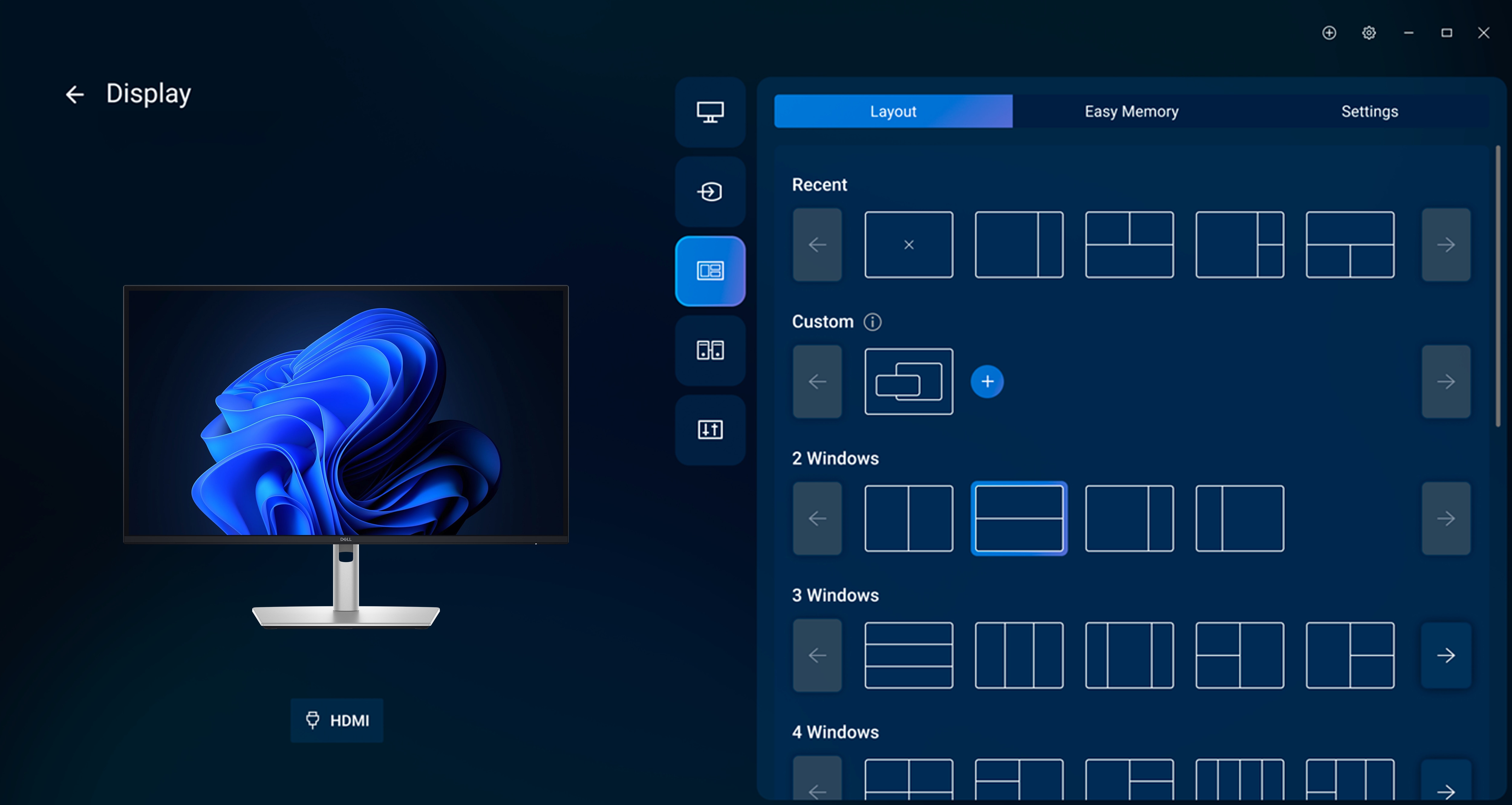
- Disclaimer: Screen image simulated for illustrative purposes only. Monitor model may vary.
Upgrade your workspace with a Dell monitor designed to deliver reliable performance, ergonomic comfort and flexible connectivity for everyday business productivity.


