


Dell Pro 27 E2726H 27-inch 1920 x 1080p FHD 16:9 120Hz 5ms LED IPS Monitor 210-BWPN


Key Features
- Anti-glare
- Eye Comfort Technology
- Cable Lock Slot
- Security Lock
- BFR Free
- PVC Free
Technical Specifications
| Specification | Details |
| Brand | Dell |
| Model | E2726H |
| Dell Part Number | 210-BWPN |
| Product Type | LED IPS Monitor |
| Display Size | 27-inch |
| Viewable Screen Size | 27-inch |
| Screen Mode | Full HD |
| Resolution | 1920 x 1080 (Full HD) |
| Aspect Ratio | 16:9 |
| Panel Type | In-plane Switching (IPS) Technology |
| Refresh Rate | 120Hz |
| Response Time | 5ms GTG (Fast) 8ms GTG |
| Brightness | 300 cd/m² |
| Contrast Ratio | 1000:1 |
| Colour Support | 16.7 Million Colours |
| Colour Depth | 8-bit (6-bit + FRC) |
| Colour Gamut | 72% NTSC (CIE 1931) |
| Pixel Pitch | 0.31140 mm x 0.31140 mm |
| Pixels Per Inch (PPI) | 82 |
| Viewing Angle | 178° Horizontal 178° Vertical |
| Surface Treatment | Anti-glare |
| Glass Hardness | 3H |
| Eye Comfort Technology | Yes |
| Eye Comfort Rating | 3 Star |
| Flicker Free | No |
| HDCP Supported | Yes |
| Stand Included | Yes |
| Stand Type | Fixed |
| Stand Adjustments | Tilt |
| VESA Mount Compatibility | 100 x 100 mm |
| Tilt Angle | -5° to 21° |
| Connectivity | 1 x HDMI Port (HDCP 1.4), supports up to 1920 x 1080 at 120Hz as specified in HDMI 1.4 1 x DisplayPort 1.4 (HDCP 1.4) 1 x VGA Port |
| Input Voltage Range | 100V AC to 240V AC |
| Frequency | 50Hz 60Hz |
| Voltage Current | 0.7 A |
| Operating Power Consumption | 14 W |
| Standby Power Consumption | 0.3 W |
| Off-Mode Power Consumption | 0.3 W |
| Maximum Power Consumption | 36 W |
| Product Colour | Black |
| Height | 355.02 mm |
| Width | 610.68 mm |
| Depth | 47.70 mm |
| Height with Stand | 452.72 mm |
| Width with Stand | 610.68 mm |
| Depth with Stand | 188.29 mm |
| Bezel Width (Top) | 6.40 mm |
| Bezel Width (Bottom) | 12.30 mm |
| Bezel Width (Left) | 6.40 mm |
| Bezel Width (Right) | 6.40 mm |
| Weight (Approximate) | 3.02 kg |
| Stand Height | 191.26 mm |
| Stand Width | 245.19 mm |
| Stand Depth | 188.29 mm |
| Weight (with Packaging) with Stand | 5.56 kg |
| Weight (with Packaging) without Stand | 4.90 kg |
| Weight with Stand & Cables (Approximate) | 3.83 kg |
| Dell Display and Peripheral Manager Compatibility | Yes |
| Warranty | 3-Year Advanced Exchange Service and Premium Panel Exchange |
| Package Contents | Monitor Stand QR Card Safety, Environmental, and Regulatory Information |
| Cable Type Included | Power Cable - 1.80 m 1 x HDMI Cable - 1.80 m (EMEA and APJC) |
Ports & Slots
- Security lock slot (based on Kensington Security Slot)
- Power connector
- DisplayPort 1.4 (HDCP 1.4) (Supports up to FHD 1920 x 1080 @ 120 Hz)
- HDMI (HDCP 1.4) (Supports up to FHD 1920 x 1080 @ 120 Hz, as per specified in HDMI 1.4)
- VGA (Support up to FHD 1920 x 1080 @ 60 Hz)

Dimensions
- Monitor height with stand: 452.72 mm (17.82 in.)
- Monitor Width: 610.68 mm (24.04 in.)
- Monitor Height: 355.02 mm (13.98 in.)
- Stand Width: 245.19 mm (9.65 in.)
- Monitor Depth: 47.70 mm (1.88 in.)
- Stand height: 191.26 mm (7.53 in.)
- Stand Depth: 188.29 mm (7.41 in.)


Get the essentials to enhance productivity with this 27-inch fixed-stand monitor certified by TÜV Rheinland® for 3-star eye comfort.
Features & Design
Enhanced eye comfort
TÜV 3-Star certified monitor for eye comfort reduces eye fatigue while you work.
Low blue light
This monitor features hardware low blue light technology, reducing harmful blue light emissions to ≤50% for all day eye comfort without sacrificing colour.

Refresh rate
120 Hz refresh rate delivers less flicker, more seamless scrolling and smoother motion.

Accurate colours
Wide colour coverage with up to 16.70M displayable colors and 72% NTSC, delivering vibrant visuals for everyday use.

Dependable from every angle
Intuitive navigation
Effortlessly adjust settings with the OSD joystick, designed for easy control.
Ultra-thin bezel design
See more with less distractions.
Colour consistency
Consistent, vibrant colours across wide viewing angles enabled by In-Plane Switching (IPS) technology.
Clear contrast
1000:1 contrast ratio and 300 nits brightness deliver picture quality perfect for your everyday productivity.​

Functional, space-saving design
Adapts to your needs
Suitable for any desk size with versatile VESA-compatible mounts and stands.
Convenient connectivity
Connect to current and legacy systems via HDMI, DP and VGA ports.
Keeps your workspace organised
Cut clutter with space-saving features like a compact stand and built-in cable management.

Dell Display and Peripheral Manager
Experience Dell’s singular, innovative application to optimise the performance of your entire Dell PC workspace.
Maximise productivity
Easy Arrange tiles apps across screens with pre-set partitions and customises up to five windows, enhancing multitasking. Easy Arrange Memory saves and restores app profiles manually, on schedule, or at start-up.
Customise your views
Work comfortably, day or night. Automate your brightness and contrast settings to match your schedule.
More manageable
Save time and boost IT efficiency with the Dell Device Management Console to manage your Dell peripheral fleet at scale, from a single cloud-based console. Discover expanded Command Line Interface features from Dell Display and Peripheral Manager.
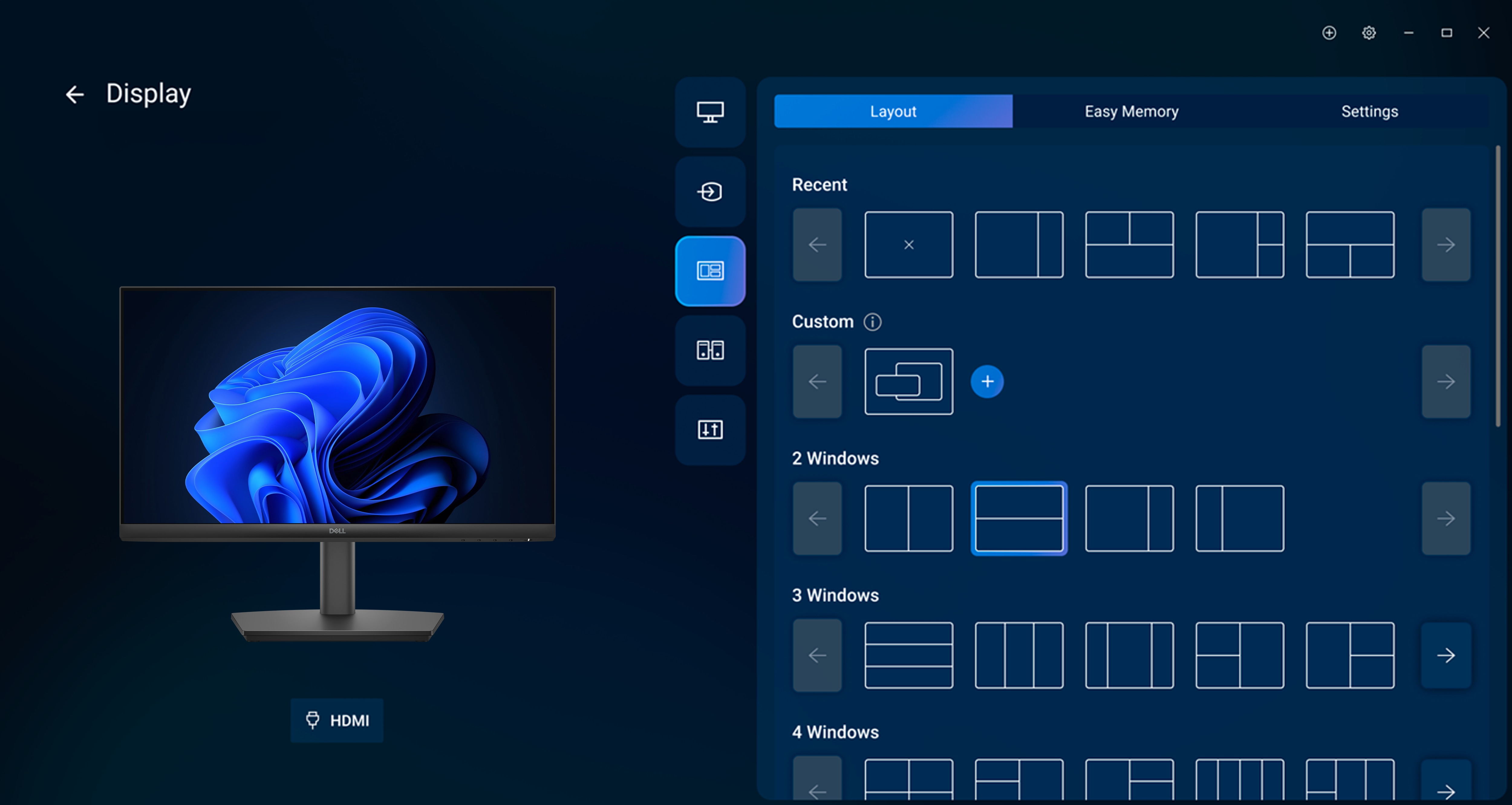
- Disclaimer: Screen image simulated for illustrative purposes only. Monitor model may vary.


